Convert, Compress, and Base64-Encode One Web Asset With an Exit After Every Step
Run a decision-oriented image workflow from format conversion through optional compression to Base64, stopping as soon as the destination accepts the asset.
Open Image Format Converter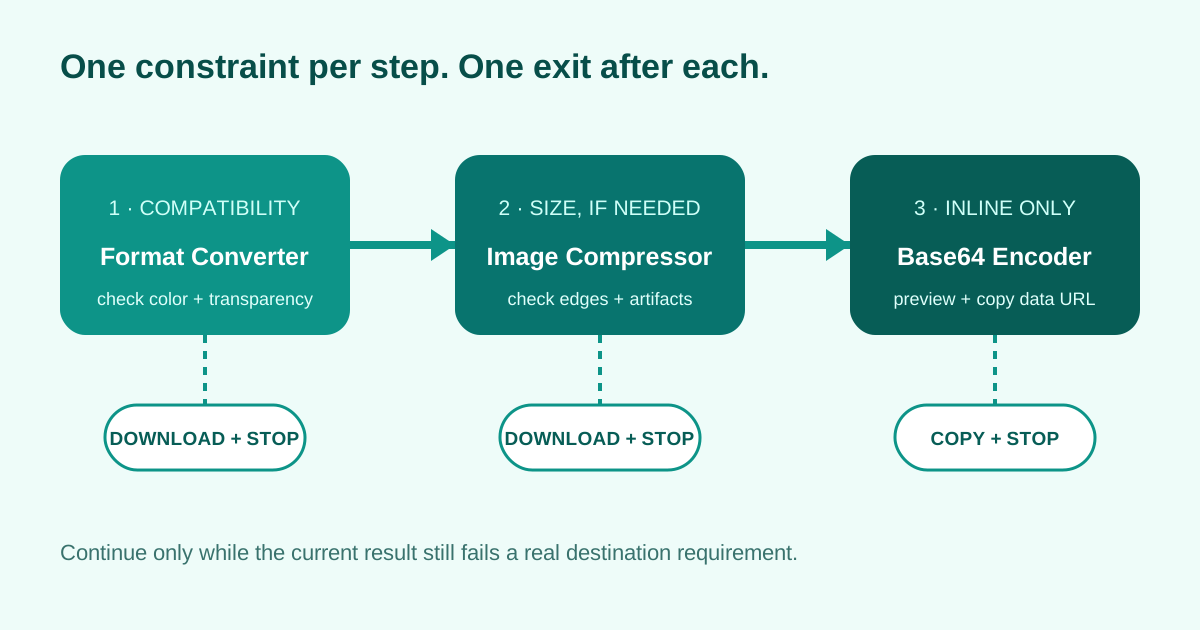
A small web asset may fail a handoff for three different reasons: the receiver rejects its format, the file exceeds a limit, or the destination accepts only an inline data URL. Solve those constraints in that order so a file is not compressed or encoded without a reason.
Tool order, checks, and stop decisions
- 1. Image Format Converter — choose PNG when transparency or lossless edges matter, or a supported photographic format when smaller delivery is the priority. Open the result and check transparency, color, and dimensions. Download and stop if the destination accepts the file.
- 2. Image Compressor — continue only when the converted file still exceeds the delivery budget. Inspect small text, sharp edges, gradients, and artifacts at the final display size. Download and stop once the file passes the limit.
- 3. Base64 Image Encoder — continue only when the destination explicitly needs an inline string. Preview the decoded image, confirm the media type, copy the full data URL, and record the original file for later updates.
When not to continue
Do not compress a crisp icon merely because compression is available, and do not Base64-encode an image when the destination can cache an ordinary file. The shortest successful path produces fewer transformations and leaves a clearer source asset.
Where this fits among UtilFlow workflows
This online workflow is an image workflow and multi-step tool workflow. A PDF workflow follows the same decision rule: continue only when the current output still fails a real requirement, and keep the download exit visible after each major step.
Related UtilFlow links
Start with Image Format Converter, continue to Image Compressor only for a measured size problem, and finish in Base64 Image Encoder only for an inline destination.
FAQ
Should I compress before converting the image format?
Usually choose the final format first, because format conversion changes the available compression methods and may already reduce the file enough.
When should I stop after conversion?
Stop when the converted file preserves the required appearance and already meets the receiver's format and size limits.
Does Base64 make the compressed image smaller?
No. Base64 makes binary data portable as text but adds raw encoding overhead; compress the actual image only when a size constraint requires it.